
Out of stock
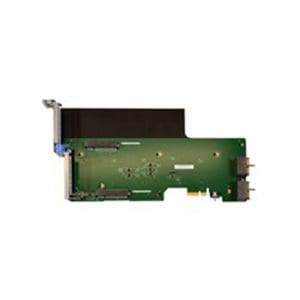
7XC7A03964 Lenovo Riser Card
7XC7A03964 Overview
Lenovo Riser Card.The exact number of PCIe slots on the riser card can vary depending on the specific model. Lenovo offers different riser cards with varying configurations to meet different server configuration needs.By using a riser card like the you can expand the server’s capabilities to handle more demanding workloads. This could involve adding more network interfaces for increased data throughput, storage controllers for expanded storage capacity, or GPUs for enhanced graphics processing and computational tasks.Out of stock

P43562-B21 HPE Low-Profile Riser Kit
P43562-B21 Overview
HPE Low-Profile Riser Kit.By using the low-profile riser kit, you can expand the server's capabilities to support additional peripherals and expansion cards, even in servers with limited physical space. This enhances the server’s flexibility and scalability, allowing it to meet diverse workload requirements.This riser kit typically includes multiple PCIe slots (the exact number depends on the specific model), which are low-profile to accommodate expansion cards that fit within a smaller space.Out of stock

UCSC-HS-C240M5= Cisco heatsink
UCSC-HS-C240M5= Overview
Cisco heatsink.The heatsink works in conjunction with a fan (not included with the heatsink itself but typically installed separately) to efficiently transfer heat away from the CPU. This process helps maintain the CPU within safe operating temperatures, preventing overheating and potential damage. Regular maintenance and cleaning of the heatsink are recommended to ensure optimal performance over time. This includes removing dust buildup and ensuring proper airflow within the server chassis.Out of stock
874309-B21 HPE Apollo 2000 Gen10 Server Node Blank Kit
874309-B21 Overview
HPE Apollo 2000 Gen10 Server Node Blank Kit.Installing the Server Node Blank Kit typically involves inserting the blanks into the empty server node slots within the chassis. This helps in optimizing the server’s cooling system by directing airflow more effectively through populated server nodes.This kit is particularly useful in data centers or server rooms where server node slots may not be fully populated initially. It ensures that the chassis operates efficiently regardless of the number of active nodes, contributing to energy efficiency and operational stability.Out of stock

UCSC-PCI-2A-240M5= Cisco Systems Riser 2A Incl 3 PCIE Slot
UCSC-PCI-2A-240M5= Overview
Cisco Systems Riser 2A Incl 3 PCIE Slot.Installing the riser card involves opening the server chassis, securely mounting the card into the designated slot (in this case, Riser 2A), and connecting any required power or data cables. Proper installation ensures that the riser card functions correctly and that the connected PCIe devices operate at their optimal performance levels.Out of stock

UCSC-PCI1C240M4 Cisco Rght PCI Rser Board
UCSC-PCI1C240M4 Overview
Cisco Rght PCI Rser Board.Installing the Right PCI Riser Board involves opening the server chassis, securely mounting the board into the designated slot (right-hand side), and connecting any necessary cables. Proper installation ensures that the riser board functions correctly and that the connected PCI devices operate at their optimal performance levels.The typically includes multiple PCI slots (exact number depends on the specific model), which can accommodate various expansion cards such as network adapters, storage controllers, or other PCI devices.Out of stock

HX-RIS-2A-240M5 Cisco 2A – riser card
HX-RIS-2A-240M5 Overview
Cisco 2A - riser card.Installing the riser card involves opening the server chassis, securely mounting the card into the designated slot (in this case, Riser 2A), and connecting any required power or data cables. Proper installation ensures that the riser card functions correctly and that the connected PCIe devices operate at their optimal performance levels.Out of stock

HX-RIS-1B-240M5 Cisco 1B – riser card
HX-RIS-1B-240M5 Overview
Cisco 1B - riser card.This riser card typically includes multiple PCIe slots (exact number depends on the specific model), which are designed to accommodate various expansion cards such as network adapters, storage controllers, GPUs (Graphics Processing Units), or other PCIe devices.Installing the riser card involves opening the server chassis, securely mounting the card into the designated slot (in this case, Riser 1B), and connecting any required power or data cables. Proper installation ensures that the riser card functions correctly and that the connected PCIe devices operate at their optimal performance levels.Out of stock

UCSC-RIS-2B-240M5= Cisco 2B – riser card
UCSC-RIS-2B-240M5= Overview
Cisco 2B - riser card. Installing the riser card involves opening the server chassis, securely mounting the card into the designated slot (in this case, Riser 2B), and connecting any required power or data cables. Proper installation ensures that the riser card functions correctly and that the connected PCIe devices operate at their optimal performance levels.Out of stock

UCSC-RIS1A-240M6 Cisco 1A – riser card
UCSC-RIS1A-240M6 Overview
Cisco 1A - riser card.Installing a riser card involves opening the server chassis, securely mounting the card into the designated slot (in this case, Riser 1A), and connecting any required power or data cables. Proper installation ensures that the riser card functions correctly and that the connected PCIe devices operate at their optimal performance levels.Out of stock

UCSC-RIS3C-240M6 Cisco 3C – riser card
UCSC-RIS3C-240M6 Overview
Cisco 3C - riser card.Installing a riser card involves opening the server chassis, securely mounting the card into the designated slot (in this case, Riser 3C), and connecting any required power or data cables. Proper installation ensures that the riser card functions correctly and that the connected PCIe devices operate at their optimal performance levels.Out of stock